What is UTA
UTA is currently a beta trading feature. It is usable, but it is not something you should connect to live funds casually. The stack is still being validated across brokers, order types, account states, and human approval surfaces; even the maintainer is still testing the edge cases. Start with a simulator, paper account, demo account, or testnet, and confirm that account reads, staging, approval, push, sync, snapshots, and error recovery all behave the way you expect. If anything feels confusing or broken, please come to Discord and report it directly. Real bug reports are the fastest way to make UTA solid enough to graduate from beta.
A Unified Trading Account (UTA) is the object OpenAlice uses for every connected trading account.
The simplest way to think about it:
broker account
  -> UTA
  -> Alice tools + Web UI
  -> Trading-as-Git history
  -> snapshots and health
Alice and the Web UI talk to the UTA. The UTA talks to the broker.
That boundary matters because every broker has a different API, order model, identifier scheme, and error vocabulary. A UTA turns those differences into one OpenAlice account surface.
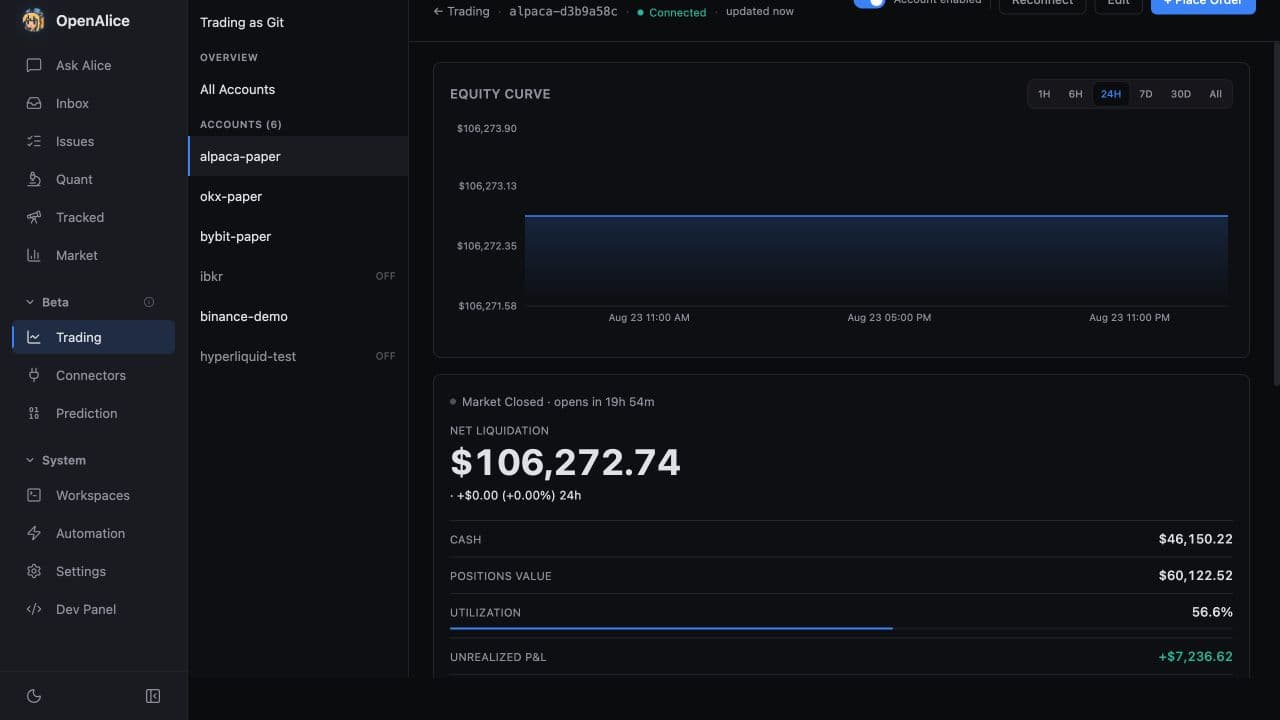
This paper-account walkthrough moves from connection health, equity, cash, and live P&L into positions, an open stop order, and the broker-backed order history. It does not place or modify a trade.
What a UTA Owns
| Piece | What it does |
|---|---|
| Broker connection | Talks to Alpaca, CCXT exchanges, IBKR, Longbridge, LeverUp, or a simulator |
| Trading-as-Git log | Stores staged, committed, pushed, filled, rejected, and observed operations |
| Execution policy | Defaults AI pushes to human approval in OpenAlice or linked Telegram; Pro mode can explicitly allow direct AI push |
| Snapshots | Captures account state for the equity curve |
| Health | Tracks whether the broker is healthy, degraded, offline, or disabled |
| Contract identity | Stamps tradeable contracts with aliceId |
Most users do not need to think about broker internals. You connect an account, Alice sees a UTA, and every operation goes through the same workflow.
OpenAlice core starts with UTA Core and the Mock simulator. Live engines are optional Broker Packs installed on demand; a missing Pack degrades only the accounts/data sources that require it and never prevents Lite-mode research or Workspace Chat.
Why Not Let Alice Call Brokers Directly?
Without UTA, every AI trading action would need to know broker-specific details:
- how a broker names contracts
- which order types it actually supports
- what a partial fill looks like
- how to recover after disconnects
- which fields are real and which are missing
- how to tell live, paper, demo, and testnet apart
That is too much broker trivia to put into every AI decision. OpenAlice keeps the AI on a single workflow: inspect account state, stage an operation, commit it, request push approval, then sync results.
Trading mode and execution authority
UTA availability is controlled globally in Settings → Agent Permissions:
- Lite keeps UTA disconnected while Alice's non-broker surfaces continue working.
- Readonly connects UTA for account and market reads but blocks venue-mutating writes.
- Pro enables the full UTA path, still subject to account permissions and the push policy.
In Pro, a UTA can stage and commit trade intent. By default, execution waits
until you approve the push in the Web UI or a linked Telegram owner's /uta
panel:
stage
  -> commit
  -> push request
  -> human approval
  -> broker dispatch
  -> sync
This is the same safety wall described in Trading as Git. The UTA owns the account-specific log behind that workflow.
The separate Allow AI to push trades switch is off by default. If an
operator deliberately enables it, an agent's tradingPush may execute the
committed operations without the human approval step. The stage → commit →
push record, account read-only policy, and configured guards still apply. Keep
the switch off for the approval-first workflow documented here.
Account Health
Each UTA tracks connection health:
| State | Meaning |
|---|---|
| Healthy | Broker is responding normally |
| Degraded | Recent failures, but requests may still work |
| Offline | Reconnection/backoff is in progress |
| Disabled | A permanent configuration problem needs manual repair |
Credential mistakes, wrong endpoints, and live/demo mismatches should be fixed through the Trading setup UI. Transient broker/network failures can recover automatically.
The aliceId
Every tradeable contract gets a composite id:
accountId|nativeKey
Examples:
alpaca-paper|AAPL
bybit-demo|BTC/USDT:USDT
ibkr-live|265598
The account id makes the contract unambiguous. AAPL in Alpaca Paper and AAPL in IBKR Live are different aliceIds because they belong to different accounts.
Multiple UTAs
You can run several accounts at once:
- a paper Alpaca account for testing
- a demo crypto account for exchange workflow checks
- an IBKR paper account for broader instrument coverage
- a live account only after you are comfortable
Each UTA has independent history and snapshots. Reading tools can query one account or all enabled accounts, but order execution always targets a specific account and contract.
Where to Go Next
- Trading Setup - Add a paper, demo, or live account.
- Broker Packs - Understand optional engine installation, updates, and repair.
- Trading as Git - Understand the approval workflow.
- Orders & Execution - See how an order moves from stage to broker.
- Snapshots & Equity - Track account state over time.