Entities & Tracking
As Alice researches, she accumulates things worth keeping an eye on — a ticker she's watching, a theme that ties several names together. Entities are how she records them: a small, durable, cross-workspace index she curates herself, surfaced to you in the Tracked tab.
It's the read counterpart to the Inbox. The Inbox is "here's a finished thing"; Tracked is "here's the running list of what I'm following, and every note that touches it."
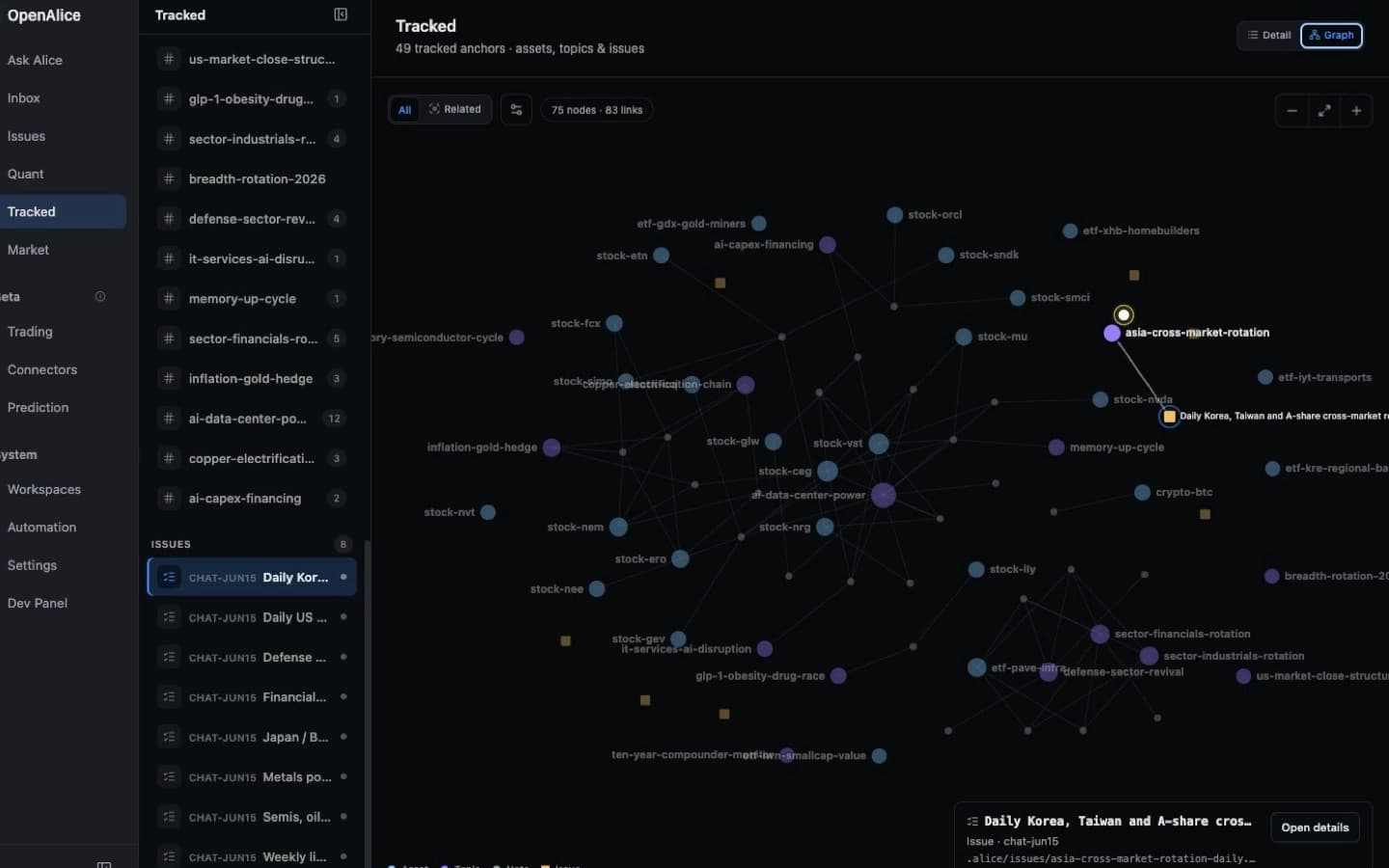
Switch from one tracked work item to the cross-workspace graph of assets, topics, Issues, and the notes that connect them.
What an entity is
A single global store (data/entities/entities.jsonl) shared across all workspaces. Each entity is deliberately minimal:
| Field | Meaning |
|---|---|
name | Short, kebab-case, no spaces. The case-insensitive key and the [[name]] link target |
type | asset (a tradable instrument) or topic (a theme that groups assets) |
description | One line that disambiguates the short name |
createdAt | Stamped once, preserved across updates |
Self-describing names
A bare ticker like ccj means nothing to a non-trader (or to the model weeks later), so an asset name is kind-prefixed:
stock-vst·stock-ccj— equitiescrypto-btc— cryptocurrenciesetf-smh— ETFs
A topic is just a short phrase: ai-data-center-power. The name is exactly what appears in [[links]] and the Tracked sidebar, so it's built to read on its own.
The two tools
Entities are managed through two identity-bound tools — reached from inside a workspace via the alice-workspace track CLI (track add / track search), and exposed to external MCP clients as entity_upsert / entity_search at /mcp/:wsId. The tool names are used below:
entity_upsert({ name, type, description })— create or update. Idempotent onname(case-insensitive), so re-tracking something updates it rather than duplicating. Returns the ready-to-paste link, e.g.{ link: "[[stock-vst]]" }.entity_search({ query? })— substring search over names + descriptions (omitqueryto list all). Read fresh on every call, so a long-running workspace sees entities other sessions just created.
The intended loop: search first to reuse an existing name, then upsert, then link. That keeps the index from fragmenting into [[vst]] and [[stock-vst]] for the same thing.
[[name]] backlinks
Once an entity exists, Alice references it in her notes with a [[name]] wikilink:
Vistra ([[stock-vst]]) is the cleanest read on [[ai-data-center-power]] —
PJM capacity auction cleared 9× higher, and its nuclear fleet is uncontracted
upside into 2026.
OpenAlice scans every workspace's markdown for these links (skipping the CLAUDE.md / AGENTS.md / README.md scaffold files so injected persona text can't manufacture phantom links). The result is a backlink index: open [[stock-vst]] a week later and the Tracked tab gathers every note across every workspace that mentions it — the whole story, without re-reading the files.
Issues share the
[[name]]namespace too. A[[name]]resolves across both kinds of node — tracked entities and issue titles — so a note can link an issue exactly like it links a stock or topic. When a link matches more than one target, a small disambiguation picker lets you choose. Because an issue title is a global object, the same title claimed by two workspaces is flagged as a duplicate-name clash on the Issue Board — a warning only; nothing is rejected, and access stays workspace-precise.
The Tracked tab
A surface in the Web UI, peer to the Inbox. Its sidebar combines deliberately tracked assets/topics with the live Workspace Issue index:
- Sidebar — assets, topics, and Issues as first-class anchors. Entity rows show backlink counts; Issue identity remains its canonical Workspace + Issue id rather than being copied into the entity store.
- Detail — an entity's description and backlinks, or an Issue's complete Markdown body without the work-item editing controls. Details opens the canonical Issue surface.
- Graph — a global relationship view where entities are anchors and the notes or Issues that mention several names become shared bridge nodes.
Use the Detail / Graph switch to move between the familiar backlink view and the relationship map; OpenAlice remembers that view choice. The graph can show every tracked entity or the exact material neighborhood of one selected entity. Filters can hide entity or material node types, while pan, zoom, and Fit move between a close inspection and the complete bird's-eye view. On a narrow screen, the initial framing favors a readable selected neighborhood; Fit still reveals the whole graph.
Selecting an entity or Issue preserves the current Detail / Graph mode. In Graph, the selected node and its immediate neighborhood receive focus while unrelated nodes recede. Short entrance waves explain how the relationship map forms; reduced-motion settings disable that motion.
Selecting a note or Issue node is preview-first: the inspector shows its type, Workspace, path, and an explicit Open details action while preserving the current viewport, filters, and scope. Navigation only happens from that action, so inspecting a material does not unexpectedly pull you out of the graph.
The selected entity or Issue is encoded in the /tracked query string. Refresh
and browser Back restore the same Tracked preview and keep one Tracked tab rather
than opening duplicates. Issues without entity backlinks remain available and
focusable in both the sidebar and Graph.
The relationship graph is derived at read time from the deliberate entity store
and authored [[name]] backlinks. It does not infer relationships from prose,
persist layout coordinates, or create a second relationship database. Unlinked
tracked entities and Issues remain visible instead of disappearing from the
overview.
Backed by GET /api/entities, GET /api/entities/:name, and the derived graph
projection at GET /api/entities/relationships/graph; the page polls so newly
tracked names and relationships appear without a reload. When report bytes are
unchanged, polling preserves the rendered Markdown nodes so text selection,
browser translation, and in-report interaction remain intact.
Adoption is taught, not forced. The
chatworkspace template's instruction file tells the agent how and when to track — when it surfaces something you'll want to follow over time — and toentity_searchbefore creating, so the habit is organic rather than a hard schema rule.
Next Steps
- Workspaces — See how workspace files become durable research context.
- Issues — Link tracked entities to self-describing work.
- Inbox — Follow pushed reports that mention tracked names.
- Equity Research — Track names that emerge from research.