Templates
OpenAlice's primary working asset is the Workspace: a repo where an agent does real work. In plain terms, a workspace is the "working repo" for a trading task — files, instructions, tools, terminal output, git history, and any artifacts the agent writes while it works.
That shape comes directly from coding-agent practice. Coding agents already know how to work in repos: read files, edit files, run commands, inspect diffs, commit changes, and resume from prior context. OpenAlice follows the same scaffold-as-harness pattern used by auto-research projects, but points it at trading: turn the task into a repo, give the agent the right tools, and let the coding-agent loop do the work. The bet is that trading agents can inherit the tooling and performance improvements that coding agents are already getting.
A template is the scaffold/harness that creates one of these workspaces.
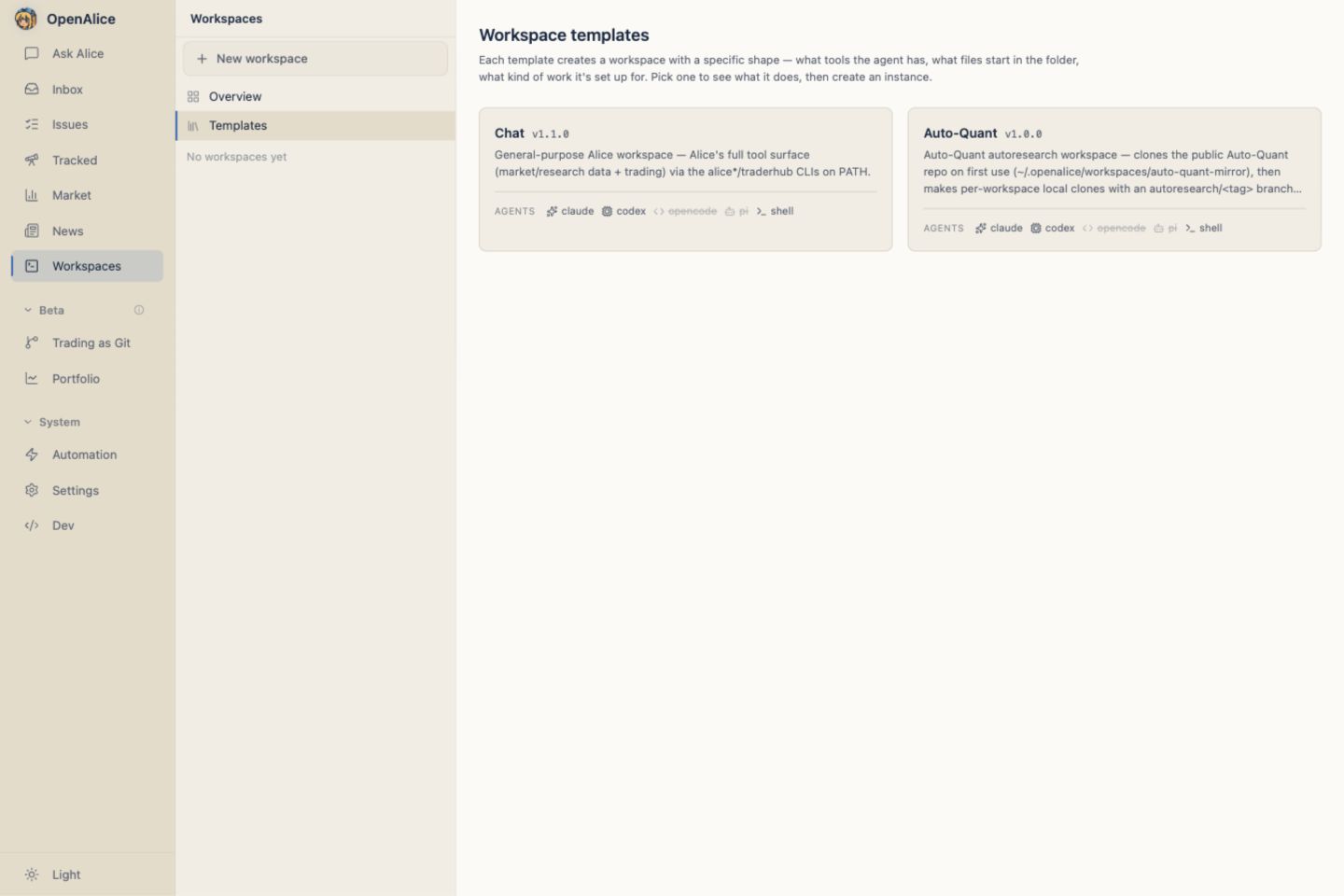
Pick a template in the Web UI's Workspaces activity, give the workspace a tag,
choose an exact source version when the template exposes one, and the
template's bootstrap.mjs lays down the repo: instruction files, initial
context, optional bundled skills, and any toolkit-specific files it needs.
The everyday example is chat. Chatting with Alice about markets is still backed by a workspace: the template packages the context and workbench for trading conversation into a git repo, injects the alice* CLI surface, and lets the agent write research, track issues, commit artifacts, and report back through the Inbox as if it were doing a coding task.
For larger toolkits, templates can also clone satellite repos at bootstrap time. That is how OpenAlice's ecosystem grows without bloating the main repo: research harnesses, backtest projects, custom MCP servers, or domain-specific tools can ship as their own repos while OpenAlice keeps owning the workspace launcher and trading surface.
Mental model
- Workspace — the working repo where the agent does the task.
- Template — the repeatable scaffold that creates a workspace shape.
- Satellite repo — an external toolkit repo a template can clone when that workspace needs more than built-in files.
Anatomy of a template
src/workspaces/templates/<name>/
├── template.json       # metadata (displayName, groupOrder, defaultAgents, ...)
├── bootstrap.mjs       # the Node (ESM) script that materializes a new workspace
└── files/              # static assets the script copies (optional)
    ├── instruction.md  # one neutral source → written to CLAUDE.md + AGENTS.md
    └── ...
template.json keys:
| Key | Purpose |
|---|---|
displayName | Human-readable label in the UI |
description | Surfaces in the create dialog |
groupOrder | Sort order in the dashboard's grouped view |
defaultAgents | Transient creation-time ordering hint for the Agent picker; it is not persisted as a Workspace allowlist |
injectTools | Whether the per-CLI playbook skills (alice / alice-analysis / alice-uta / alice-workspace / traderhub) are injected into .claude/skills/ and the shared .agents/skills/ tree so the agent knows the alice* CLI surface. The launcher injects no MCP into workspaces |
injectInstructions | Whether the template's instruction.md is copied to CLAUDE.md and AGENTS.md; released third-party injectPersona: true is accepted as a compatibility alias only |
bundledSkills | Skill folders copied into the workspace (e.g. scan-value-chain, build-thesis, sector-rotation, opencli-reader) |
source | Optional approved repository plus exact default/alternative version-to-commit mappings |
community | Marks a template as community-contributed — the UI groups it under a separate "— community" tier, set apart from the official templates |
agentCredentials | Optional per-agent map (agentId → { credentialSlug, model? }) that seeds secret-free fixed preferences for both interactive and headless modes in .alice/settings.json before the initial commit — the per-template counterpart to the user-level Default workspace credentials (Settings › AI Provider). The vault key is never copied into the Workspace. When both are set, the template's agentCredentials wins per Agent. No in-repo built-in template currently declares it, so the user defaults are normally the effective source. |
One skill is always injected, regardless of template:
self-scheduling, which teaches the agent the per-issue markdown format (.alice/issues/<id>.md) so any workspace can give itself a tracked issue or recurring task. It's ungated (unlike theinjectToolsCLI playbooks) because it only needs thealiceCLI, which is onPATHeverywhere — so even a tool-less template's headless run can report back to the Inbox.
bootstrap.mjs is the contract — a plain ESM Node script (no TypeScript). It receives process.argv[2] = tag, process.argv[3] = outDir, plus a few environment variables (AQ_TEMPLATE_FILES_DIR, AQ_LAUNCHER_REPO_ROOT, optional AQ_LAUNCHER_ROOT defaulting to ~/.openalice/workspaces) and produces a ready-to-use workspace directory. The launcher spawns it on OpenAlice's bundled Node (process.execPath + ELECTRON_RUN_AS_NODE), and all git goes through OpenAlice's bundled git (dugite) via _common.mjs's git() helper. So a built-in template needs no bash, no Git for Windows, and no system git — it works on a bare Windows or bare Mac box. bootstrap.sh is still supported as a fallback for third-party templates that ship bash.
Packaged desktop builds also supply managed fd and ripgrep for Pi, so its normal search-tool probe does not download a separate copy into every Workspace.
Guidance snapshots
Template instructions and skills are copied into the new Workspace and committed with its initial desk state. OpenAlice does not silently overwrite them later: the Workspace may have edited its own guidance, and an invisible replacement would mutate durable work history.
The template README version records material guidance changes. Older Workspaces can show that an upgrade is available; OpenAlice never silently rewrites their durable files.
Template Upgrade uses the exact creation/last-upgrade baseline for a three-way comparison with the current Workspace and incoming template. Unmodified managed files can update automatically, Workspace-only edits are preserved, and files changed on both sides require an explicit per-file choice. Apply is transactional, recovery-aware, and creates an audit commit.
Only templates that declare a managed-context upgrade strategy participate. Source-backed Harnesses such as AutoQuant and Auto Prediction use the separate preview-first Harness source-upgrade contract; generic Template Upgrade never rewrites their upstream source choice.
Preview one desk from Workspace settings or audit the floor through Workspace Manager. See Upgrades & Absorb for the complete review contract.
Built-in templates
chat
The default workspace: a git directory whose template-owned instruction file
contains Alice's baseline identity and is copied to both CLAUDE.md and
AGENTS.md, so whichever Agent you pick boots already "as Alice." There is no
mutable installation-wide persona source. Its bundledSkills are the pre-trade
research and reader skills — scan-value-chain, build-thesis,
sector-rotation, retrospective, opencli-reader — plus
delegate-autoquant for bounded handoffs to the initialized Quant desk.
Separately, injectTools: true injects the per-CLI playbooks (the alice /
alice-analysis / alice-uta / alice-workspace / traderhub skills) so the
agent knows the alice* CLI surface.
The chat workspace is what you reach for when you want Alice with full tools but no other scaffolding — research, ad-hoc analysis, exploratory questions.
auto-quant-v2
The AutoQuant Harness creates a quantitative
research desk from an exact approved
AutoQuant V2 release. New desks
default to v0.9.34; v0.9.32, v0.9.31, v0.8.31, v0.8.30, and
v0.8.27 remain selectable for reproducibility.
Bootstrap preserves the upstream Git history and canonical origin, starts a
fresh research branch at the selected commit, and records the source in
.alice/harness-source.json. AutoQuant's own AGENTS.md remains authoritative,
so this template sets injectInstructions: false while still injecting OpenAlice
collaboration, data, Inbox, and UTA skills. Existing Classic Workspaces are not
migrated.
auto-prediction
The Auto Prediction Harness creates a
prediction-market research desk from an exact approved Auto Prediction release.
New desks default to v0.1.2. Its upstream repository owns evidence,
campaigns, SQLite state, and the Studio app; OpenAlice owns the Agent Session,
Workspace lifecycle, supervision, and managed Surface route.
Like AutoQuant, bootstrap retains upstream Git history and records the exact
source in .alice/harness-source.json. The template keeps upstream instructions
authoritative while injecting the OpenAlice CLI and collaboration skills.
Satellite-repo pattern
OpenAlice's main repo deliberately doesn't accept ecosystem PRs — it owns the Trading domain and the workspace launcher; everything else routes through satellite repos.
main repo (OpenAlice)              satellite repo (your toolkit)
├── src/                           ├── README.md
│   ├── core/                     ├── tools/
│   └── workspaces/               ├── data/
│       └── templates/            └── (optional) MCP server
│           └── <yours>/
│               ├── template.json
│               ├── bootstrap.mjs  ← clones your satellite repo
│               └── files/
└── services/uta/src/domain/trading/  ← broker/trading runtime
Why split:
- Template authors ship on their own cadence. No PR queue, no review cycle gated on the main repo.
- OpenAlice's
src/stays small. Trading domain + workspace launcher is the focus; ecosystem code doesn't compile-in. - Versioning is per-toolkit. A satellite repo can pin to a specific shape of the data, refactor its internals, or even change languages, without affecting OpenAlice or other satellites.
- Provenance is obvious. The bootstrap script's
git clone <url>line tells the user where the workspace's code came from. No hidden dependency on a vendored copy.
auto-quant-v2 is the canonical example — it materializes one exact external
release with upstream history, keeps its own research state, and can evolve
without vendoring the Harness into OpenAlice.
Writing a new template
Three steps:
- Create the directory at
src/workspaces/templates/<name>/withtemplate.json+bootstrap.mjs. Optionalfiles/for static assets. - Write the bootstrap. Import
../_common.mjsfor the shared helpers —initWorkspaceDir,copyReadme,setupGitExcludes, andgit(run every git command throughgit()so it uses the bundled git, neverspawn('git')). Instruction and skill injection aren't done here — the launcher (context-injector.ts) owns those, gated by yourtemplate.jsonflags (injectTools/injectInstructions) — so the bootstrap only lays down the directory, runs its owngit init, and copies any template-specific files. - Restart OpenAlice. Templates are discovered at startup via
TemplateRegistry.load()and cached for the server's lifetime. The new template appears in the Workspaces create dialog.
A built-in bootstrap.mjs runs on the bundled Node, so it's portable by construction — use node:* builtins and the _common.mjs helpers, route every git call through git(), and never shell out to bash / sed / system git. Don't add new .sh bootstraps for in-repo templates; bootstrap.sh remains only for third-party / satellite templates that already ship bash (those run only where bash is on PATH — Git for Windows / WSL2).
If your template depends on a sizeable external repo (data, models, a build artifact), use the satellite-repo pattern: keep that repo separate, have the bootstrap git clone it. Don't vendor it into the OpenAlice main repo.
Next Steps
- Workspaces — Understand what every template materializes.
- AutoQuant — Use the pinned AutoQuant V2 Harness.
- Auto Prediction — Use the pinned prediction-market Harness and managed Studio.
- File-based State — Keep generated files inspectable and portable.
- Custom Tools — Pair templates with new domain tools.
- Inbox — Decide how template-specific agents should report results.
- Upgrades & Absorb — Reconcile newer managed assets without overwriting local work.