AI Providers
OpenAlice does not run the main model loop inside its own backend. The model lives in a native Workspace CLI — Claude Code, Codex, Cursor Agent, Antigravity, Grok Build, Oh My Pi, OpenCode, or Pi — so each agent keeps its own login, config format, prompt cache, terminal behavior, and provider quirks.
What OpenAlice keeps is the configuration layer around that loop: a credential vault for optional API-key overrides, plus Workspace and Session bindings that project an explicit selection into the chosen CLI. With runtime-managed access, login, environment, and provider configuration stay under the selected CLI and never get imported into the vault.
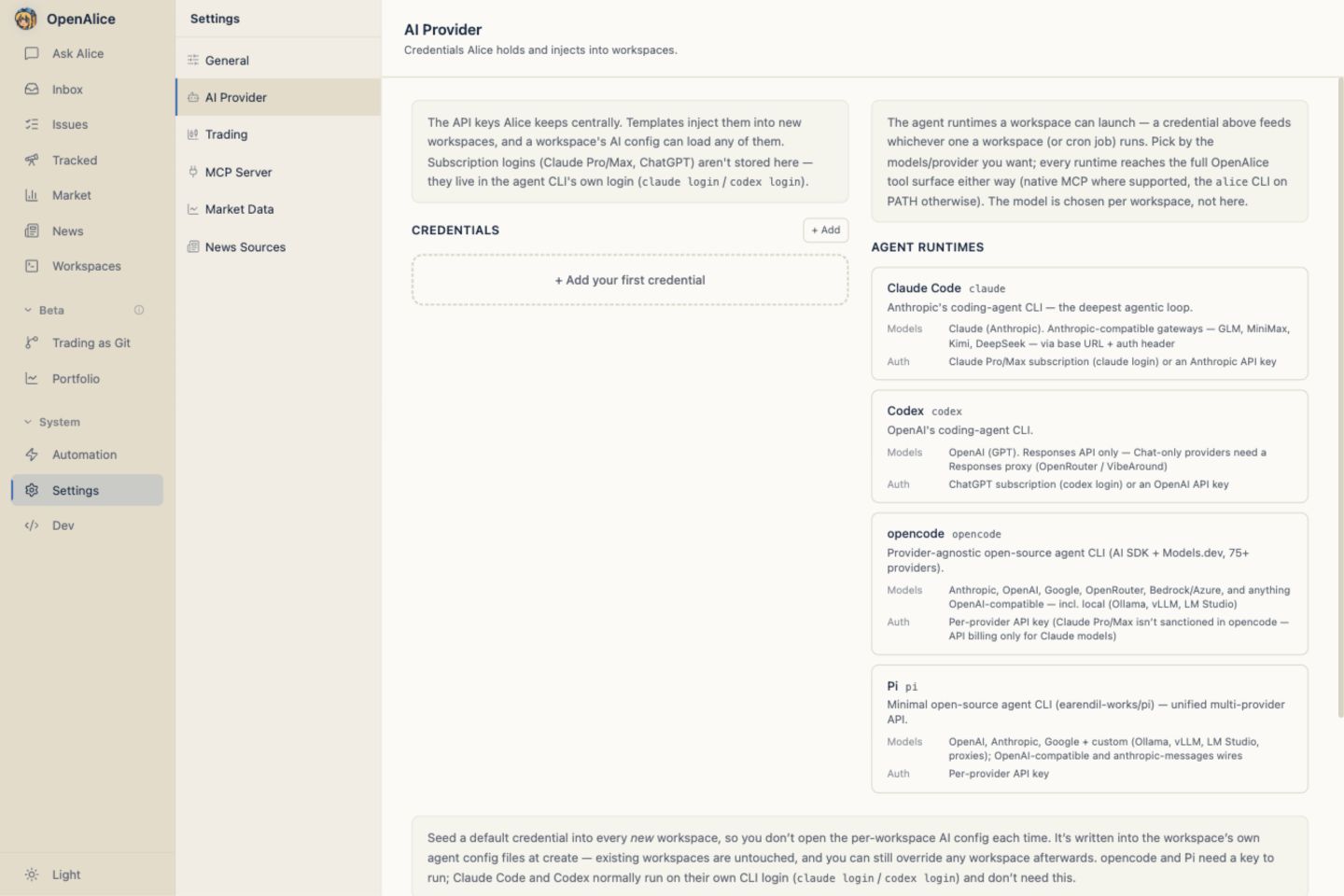
Two different "providers" — don't conflate them. This page is about AI model providers (the keys that drive the agent CLI). The keys that power market data — FRED, FMP, EIA, … — are a separate thing entirely, and you mostly don't need them at all: the Data Hub serves that data keyless. When you do bring your own, they live in
market-data.json/provider-keys.json, not the vault here.
Two ways a Session gets a model
- Runtime-managed access (zero OpenAlice credential config) — Authenticate or configure the selected native CLI through its own login, environment, and config chain. A new Session uses that state when no Alice-managed credential is selected.
- Explicit vault credential — Add an API-key credential on Settings → AI Provider, then choose it for a new Workspace, a Workspace's AI preferences, or the next Session. The selection becomes an explicit override; merely saving a compatible key in the vault never replaces runtime-managed state.
Packaged desktop shortcut. The macOS and Windows desktop packages include a managed Pi runtime. Its native
/loginstate persists inside the selected OpenAlice home, or you can save a compatible vault key as a Workspace-specific override. No separately installed agent CLI is required.
The credential vault
Credentials live in ~/.openalice/data/config/ai-provider-manager.json as a map of slug → credential:
{
  "credentials": {
    "glm-1": {
      "vendor": "glm",
      "authType": "api-key",
      "apiKey": "•••",
      "wires": {
        "anthropic":   "https://open.bigmodel.cn/api/anthropic",
        "openai-chat": "https://open.bigmodel.cn/api/paas/v4"
      }
    }
  }
}
| Field | Meaning |
|---|---|
vendor | anthropic / openai / google / xai / minimax / glm / kimi / deepseek / longcat / openrouter / cursor / custom |
authType | api-key (key stored here) or subscription (the CLI holds the login; no key) |
apiKey | The secret — present for api-key, absent for subscription |
wires | The load-bearing field — a map of wire shape → endpoint URL |
baseUrl | Optional endpoint for a runtime-direct credential such as Cursor Dashboard; it is not a wire declaration |
A credential is deduplicated by { vendor, authType, apiKey }: re-adding the same key upgrades its wires in place rather than creating a duplicate. Save a key once, then add more shapes/regions to it later.
Wire shapes
A "wire shape" is the on-the-wire HTTP protocol an endpoint speaks — independent of the model. There are four:
| Wire shape | Protocol | Spoken by |
|---|---|---|
anthropic | Anthropic Messages API | claude, omp, opencode, pi |
google-generative-ai | Google's native Gemini generateContent API | agy, omp, opencode, pi |
openai-chat | OpenAI Chat Completions | grok, omp, opencode, pi |
openai-responses | OpenAI Responses API | codex, grok, omp, opencode, pi |
openai-chat and openai-responses share a base URL but are not interchangeable on the wire — that's why they're distinct shapes. A single key can declare several shapes at once (wires is a map), so one GLM key, for example, covers both an Anthropic-compatible endpoint and an OpenAI-Chat-compatible one.
How a credential reaches a Workspace or Session
When a creation default, Workspace setting, or Session launch explicitly selects a vault credential, OpenAlice picks the shape the target agent speaks, by preference:
| Agent | Wire preference |
|---|---|
claude | anthropic |
codex | openai-responses |
agy | google-generative-ai |
grok | openai-chat → openai-responses |
omp / opencode / pi | google-generative-ai → openai-chat → anthropic → openai-responses |
Cursor Dashboard credentials are the deliberate exception to this wire funnel.
They use vendor cursor, declare no wire, and are offered only to Cursor Agent.
OpenAlice passes the key directly as CURSOR_API_KEY rather than pretending it
is an OpenAI-compatible endpoint.
It selects the first wire the credential actually declares that the agent can speak (pickAgentWire), then projects the binding into that CLI's native launch/config shape. If a credential offers no shape the agent can speak (for example, an OpenAI-Chat-only key for codex), the selection is rejected rather than writing or launching a broken config.
See Settings Injection — Workspace runtime settings.
The preset catalog
The Web UI's credential form is driven by a preset catalog — suggestions only, not an execution layer. Each preset declares a vendor's model list and its regions × wire shapes, so the form can pre-fill endpoints and gate you to a valid region/key pair. Known models appear in an explicit keyboard-accessible suggestion menu, but the input remains editable: a model id that is not yet in the catalog is still valid.
| Preset | Wires | Notes |
|---|---|---|
| Claude (Subscription) | — | Your Claude Pro/Max via the Claude Code login. No key. |
| Claude (API Key) | anthropic | Direct Anthropic key. |
| Codex (Subscription) | — | ChatGPT subscription via the Codex login. No key. |
| Codex (API Key) | openai-responses, openai-chat | Direct OpenAI key. |
| xAI (API Key) | openai-chat, openai-responses | Direct xAI key; works with Grok Build, Oh My Pi, OpenCode, and Pi. |
| OpenRouter | anthropic, openai-chat, openai-responses | One gateway key for exact provider/model ids; Claude uses the Anthropic skin, Codex uses Responses, and Grok/Oh My Pi/OpenCode/Pi use an OpenAI-compatible wire. |
| Cursor Dashboard | runtime-direct | Cursor Dashboard key; consumed only by Cursor Agent. |
| Google Gemini | google-generative-ai | Native Gemini API; works with Antigravity, Oh My Pi, Pi, and opencode. Antigravity also requires its upstream modelProvider: "gemini" setting. |
| MiniMax / GLM / Kimi | anthropic, openai-chat | Region-aware (China vs International). |
| DeepSeek | anthropic, openai-chat | Single platform; includes V4 Pro and the fast/economical V4 Flash suggestion. |
| LongCat | anthropic, openai-chat | Meituan LongCat; use Claude, Oh My Pi, OpenCode, or Pi unless a Responses-compatible endpoint is added. |
| Custom | any | Pick vendor, wires, and endpoints manually. |
Region-aware endpoints. Chinese vendors with split deployments — MiniMax, GLM, Kimi — have separate China and International consoles with region-locked keys. The picker gates you to a valid pair so you can't paste a China key against an International endpoint.
MiniMax reasoning transport. Oh My Pi, Pi, and opencode use MiniMax's
Anthropic-compatible endpoint even when the saved credential also exposes
OpenAI Chat. Their generic OpenAI transports do not preserve MiniMax's
reasoning_details extension losslessly; choosing Anthropic keeps thinking
blocks and multi-turn replay intact.
Native Gemini wire. Saved Google credentials use
google-generative-ai, which accepts current Google authorization keys.
Antigravity can receive the key as GEMINI_API_KEY, but its CLI ignores that
environment variable unless ~/.gemini/antigravity-cli/settings.json already
sets modelProvider to gemini; OpenAlice never writes that upstream file.
Claude Code, Codex, Cursor Agent, and Grok Build do not speak the native Gemini
wire; use Antigravity, Oh My Pi, Pi, or opencode for Gemini. Saved
formats from before the 0.89.2 baseline are not supported upgrade inputs.
OpenRouter gateway. OpenRouter is a third-party gateway rather than a
first-party model vendor. Its preset declares OpenAI Chat and Responses at
https://openrouter.ai/api/v1, plus Anthropic Messages at
https://openrouter.ai/api; the Anthropic path uses Bearer authentication and
must not gain an extra /v1. Suggested ids use OpenRouter's exact
provider/model slugs, with openai/gpt-5.6-luna as the current coding default,
but any other catalog id may be pasted. The bundled suggestion set also
includes the current top-weekly text models from DeepSeek, Tencent, GLM, and
Xiaomi plus known Claude, GPT-5.6, Grok, Gemini, MiniMax, Kimi, and DeepSeek
tiers. Registered slugs carry their exact context/reasoning metadata; an unknown
pasted slug deliberately falls back to the native runtime. Existing Custom
credentials that point at OpenRouter continue to work without conversion.
Test before save. Adding a wire-based credential runs a one-shot probe against the chosen wire + endpoint + key — a single "Hi" round-trip — before it commits. The same probe backs the per-Workspace AI-config Test button. This probe is the only in-process AI call left in OpenAlice; it validates a key, nothing more. A runtime-direct Cursor Dashboard key cannot use that HTTP probe; Cursor Agent validates it at launch.
AI Provider and Agent runtime settings
The Web UI separates saved AI access from native CLI discovery:
- Vault — search saved credentials, give any preset an optional display name, and list / add / test / delete entries while retaining the stable slug, vendor, wire shapes, and resolved endpoint.
- Default workspace credentials — optional creation seeds that become secret-free preferences in each new Workspace. See below.
- Model semantics — known models resolve their context limit, reasoning policy, supported effort levels, and published provider default automatically. The published default is descriptive help, not an implicit launch choice.
Saved credentials can discover model IDs through their provider's read-only model-list API. The picker immediately uses a cached list when available and refreshes it in the background after a day; a failed refresh preserves the prior list. Native account model discovery belongs to the selected Agent runtime. Unsupported or unavailable discovery leaves bundled suggestions and manual model IDs available; an empty successful catalog is shown as empty rather than filled with guessed models.
Those three concerns remain on Settings → AI Provider. Open Settings → Agent runtimes for the separate machine-local catalog of Claude Code, Codex, Cursor Agent, Antigravity, Grok Build, Oh My Pi, OpenCode, and Pi: installation path, model/auth summary, readiness check, repair guidance, and quick-access order. Runtime installation state is discovered from the current machine and is never copied into the credential vault.
Runtime discovery and quick access
Fresh-Session runtime menus keep a compact working set of at most four installed runtimes. Others opens the complete searchable catalog, including uninstalled runtimes with install guidance. The currently selected runtime remains visible even when it sits outside the compact set.
The compact order is intentionally adaptive:
- Agent runtimes from successful Session launches, newest first;
- the manual fallback order saved under Settings → Agent runtimes;
- the cold-start order Pi, Codex, Claude Code, then Grok Build;
- any remaining installed runtimes in registry order.
Merely selecting a runtime—or attempting a launch that fails—does not promote it. Uninstalled runtimes never occupy an automatic slot. Up to four manual fallback entries can be pinned and reordered; recent successful use still takes precedence so the frequent launch path follows actual work.
The picker is a selection surface rather than a diagnostics table. Normal Ready and Not checked states stay quiet there, while checking and confirmed failures such as Sign-in needed, AI provider needed, timeout, unexpected output, or probe failure remain visible. The full Settings catalog shows every state, including Installed · Not checked, and lets you probe one runtime or refresh the whole catalog. An installed but unprobed runtime is not a failure.
Default workspace credentials
Choosing a vault credential per Workspace can be tedious when you create desks
frequently. Default workspace credentials are optional creation seeds: the
user-level counterpart to a template's per-Agent
agentCredentials. Pick a compatible vault
credential per Agent once, and a new Workspace begins with that preference for
both interactive and headless launches.
Defaults are stored as workspaceCredentialDefaults in
ai-provider-manager.json, alongside the vault itself. At Workspace creation,
OpenAlice translates compatible defaults into .alice/settings.json: only the
credential slug, wire shape, model, and any explicitly selected reasoning
effort are written. The API key and endpoint remain in the central vault and
are resolved for the child process only when a Session launches.
Setting a creation seed affects future Workspaces only. Existing Workspaces keep their own portable preferences, and every fresh launch can explicitly let the Agent runtime manage access or choose another compatible saved credential.
There is no global context-window policy. Known models get their documented limit from OpenAlice's model registry; an explicit Oh My Pi, Pi, or opencode context choice belongs to that particular model binding. Changing models clears an old manual capability override instead of silently carrying it forward.
Creation seeds exposed in Settings
The Settings page currently exposes the four established creation-seed rows. It splits them into a primary case and an advanced reveal:
| Agent | Wires a default may use | Where in the UI |
|---|---|---|
opencode | google-generative-ai / openai-chat / anthropic / openai-responses | Primary — shown by default |
pi | google-generative-ai / openai-chat / anthropic / openai-responses | Primary — shown by default |
claude | anthropic only | Advanced — unofficial API |
codex | openai-responses only | Advanced — unofficial API |
All four runtimes can manage their own complete login and provider state. OpenCode and Pi stay visible as the primary custom-provider cases; Claude Code and Codex sit behind the "Advanced — unofficial API" reveal because their built-in subscription access is normally the clearer path. Cursor Agent, Antigravity, Grok Build, and Oh My Pi remain selectable in new-Session and Workspace settings; the defaults API also validates compatible registered adapters even though the legacy Settings seed editor does not yet add rows for them. Any creation seed is an explicit Workspace preference for future Workspaces only.
Each Agent's dropdown offers only the vault slugs that Agent can actually speak
(the wire-shape funnel computed server-side: claude → anthropic-only, codex
→ openai-responses-only, opencode/pi → any compatible declared wire), plus
Let Agent runtime manage access to leave credentials and provider
configuration under that Agent.
Seeding mechanics
Creation writes the secret-free .alice/settings.json before the Workspace's
initial git commit, so the fixed preference is part of the desk's inspectable
history without exposing a key. It initializes the same compatible preference
on the interactive and headless modes and pins a compatible default Agent
from the template's declared order.
Seeding is best-effort: an unregistered adapter, a dangling slug (credential
since deleted), or an incompatible wire warns and skips — the Workspace
stays fully usable. The effective source merges user defaults with the
template's agentCredentials, with the template winning per Agent.
Native project files such as .codex/config.toml, opencode.json, and
.pi/settings.json are no longer the managed-Session default store. Workspace
Settings retains a clearly labeled Native CLI config export (Deprecated)
only for users who intentionally launch a CLI directly in that directory.
Deleting a vault credential also prunes any future-Workspace creation default that referenced it. Existing
.alice/settings.jsonfiles are not rewritten; a dangling reference fails visibly at the next fresh launch rather than selecting another account.
Existing Workspace AI preferences
Open Workspace Settings → AI preferences to inspect both Interactive sessions and Headless runs. Each mode can follow its most recent successful Agent or pin a fixed default Agent. Every Agent row can likewise follow its recent access/model/effort tuple or pin a fixed runtime-managed-or-vault tuple. Edits autosave atomically across the two modes; recent successful launches continue updating only the separate recent layer.
Workspace Settings → Agent runtimes remains the Workspace-specific launch preview and deprecated native CLI config export. Use the global Settings → Agent runtimes page for machine discovery, readiness repair, and compact runtime-menu preferences. Neither surface defines managed-Session credential defaults.
Quick Start runtime and AI access
Ask Alice reuses the selected or recent Chat Workspace. Workspace and Agent runtime form the launch context above the composer. AI access inside the composer then offers runtime-managed access and compatible saved vault credentials. The controls describe one fresh launch; once that binding is accepted, it becomes the recent interactive preference for that Workspace and Agent without changing an existing Session.
Model and effort share a compact summary control with nested choices, but remain independent and provider-aware. Known models expose their registered effort tiers; a custom model id remains valid. After a fresh launch is accepted, OpenAlice remembers the compatible AI access/model/effort tuple under that Workspace's interactive surface and Agent. The visible choices are the launch disclosure; secrets and provider payloads stay out of the Workspace file.
Ordinary Chat, Manager, spawn, and resume actions do not wait for a synchronous runtime readiness probe. Readiness remains a diagnostic/background health signal. If runtime-managed login, quota, or provider setup fails during the real launch, OpenAlice settles the opening state and shows the runtime error so you can fix the CLI login or choose an explicit vault override and retry.
API
The section is backed by two routes (optional — the UI calls them for you):
| Route | Behavior |
|---|---|
GET /workspace-credential-defaults | Returns the current defaults plus, per agent, the vault slugs it can be driven by (the wire funnel, server-side). |
PUT /workspace-credential-defaults | Replaces the whole map with per-agent, model-specific creation defaults. Registered AI-capable adapters pass through after compatibility validation; an empty credentialSlug clears that agent's default. |
Model semantics, reasoning, and context
The Ask Alice composer shows the effective AI source, model, reasoning effort, and model-specific context before launch when those facts are available. The values come from the Workspace's secret-free launch preference; selecting another credential shows the pending Session override that will be captured on Send.
Choose these controls before starting a fresh Session, or use Provider settings to manage the central vault and future-Workspace seeds. An already created Session ignores later Workspace preference changes. To change only that coworker, pause it and use Change AI; otherwise start a new Session to adopt the Workspace's current defaults.
OpenAlice keeps a curated, offline registry for known model semantics. It distinguishes optional, adaptive, required, and unsupported reasoning rather than reducing every model to one checkbox. When a provider documents effort tiers, the Workspace picker offers only the supported values and projects the selection into the native runtime:
| Runtime | Native Workspace setting |
|---|---|
| Claude Code | effortLevel |
| Codex | model_reasoning_effort |
| Cursor Agent | --model; effort and Fast are already suffixes in Cursor's model id |
| Antigravity | --model and --effort low|medium|high |
| Grok Build | --model and --effort |
| Oh My Pi | --model and --thinking |
| opencode | provider/model options and effort variants |
| Pi | defaultThinkingLevel |
Unknown free-typed models remain valid. OpenAlice omits facts it does not know so the native runtime can apply its own fallback; advanced overrides are available where Oh My Pi, Pi, or opencode needs an explicit capability registration.
Additional native runtimes
Cursor Agent, Antigravity, Grok Build, and Oh My Pi are supported in current releases
but are not bundled replacements for the desktop's managed Pi.
OpenAlice discovers them from PATH; the runtime picker shows an install hint
and the authoritative upstream link when one is missing.
- Cursor Agent launches only the
cursor-agentbinary. Usecursor-agent loginfor runtime-managed access, or save the dedicated Cursor Dashboard credential. OpenAlice passes--model <id>unchanged. Cursor's live ids encode effort and Fast as suffixes such ascursor-grok-4.6-high-fast, so there is no separate effort picker. - Antigravity launches only Google's
agybinary—neverantigravityorgemini. Use its native browser/keyring login, or a Gemini vault key after configuring the upstream Gemini provider setting described above. OpenAlice projects--modeland onlylow,medium, orhigheffort. Model lists vary by authentication and billing tier; exact third-party ids remain free-typed. Resume uses Antigravity's conversation identity behind the publicresumeId. - Grok Build launches
grok. It can usegrok loginor a compatible xAI vault key; both access paths use the same CLI model ids. The first-party suggestions aregrok-4.6with requiredlow,medium,high, orxhigheffort, andgrok-4.5with requiredlow,medium, orhigheffort. Both advertise a 500k-token context and default tohigh. Other ids remain free-typed and use the runtime's own fallback semantics. - Oh My Pi launches
ompand keeps its own home and native Session files. It can use its own/loginor a compatible Google, OpenAI, Anthropic, xAI, or gateway credential. OpenAlice projects model plus--thinking;nonemaps to nativeoff, andultrais rejected.
All four support interactive and headless product Sessions, exact native
continuation, and runtime-managed or explicit Workspace bindings. Their native
Session ids remain backend details behind OpenAlice's resumeId.
The catalog shown for new credentials currently recommends Claude Opus 5 for complex Anthropic agent work and Gemini 3.6 Flash as Google's balanced agentic default; Gemini 3.5 Flash-Lite is the faster, economical choice. These defaults initialize a new credential form only. Existing saved credentials keep their selected model.
Codex GPT-5.6 identities
Codex uses explicit GPT-5.6 model ids rather than the bare gpt-5.6 family
alias. A ChatGPT-authenticated Codex Session defaults to gpt-5.6-sol; current
creation flows and documentation write that explicit id. Persisted records from
before the 0.89.2 baseline are not automatically rewritten.
| Codex access | Models and context | Published effort metadata |
|---|---|---|
| ChatGPT / Codex login | Sol, Terra, and Luna; 272,000-token context | Sol: low–ultra, default low; Terra: low–ultra, default medium; Luna: low–max, default medium |
| OpenAI API key | Sol and Terra: 1,050,000-token context; Luna: 400,000 | Optional none, low, medium, high, xhigh, or max; default medium |
Sol is the power/default tier, Terra is balanced, and Luna favors faster or
cost-efficient work. Subscription capabilities stay separate from OpenAI API
capabilities: in particular, ultra is a native Codex option for Sol and Terra,
not an API effort tier.
When effort remains Not specified, OpenAlice may show the provider's published default as help, but it does not persist or project that value. The Session binding omits effort and lets the model/provider decide. Only choosing an effort creates an explicit runtime override.
The known deepseek-v4-flash profile exposes a 1,000,000-token context window,
up to 384,000 output tokens, interleaved optional reasoning, and the supported
low, high, and max effort levels (high is the published provider
default). These are model semantics, not a restriction on using other DeepSeek
model ids.
New Kimi Open Platform credentials default to kimi-k3. Its registered profile
has a 1,048,576-token context window, requires reasoning, and offers low,
high, and max effort with max as the published provider default. Existing
credentials keep their remembered model selection; K2.7 Code HighSpeed, K2.7
Code, and K2.6 remain available presets.
Per-channel overrides
The Web UI's lightweight chat sub-channels can carry their own system prompt and disabled-tools list in data/config/web-subchannels.json:
[
  {
    "id": "research",
    "label": "Research",
    "systemPrompt": "You are a research assistant...",
    "disabledTools": ["placeOrder"]
  }
]
For serious multi-model work, prefer a dedicated workspace per agent — that's where the model actually runs.
Next Steps
- Installation Overview — Choose the right run path for your machine.
- Workspaces — See where credentials are injected into native agent configs.
- Configuration Reference — Inspect the credential vault shape.
- Quick Start — Start a workspace-backed conversation after setup.