Trading as Git
Every trade in OpenAlice follows a git-like workflow: stage operations, commit with a message, push to execute. If you use UTA, this is the required path for account mutation.
The point is controlled execution and auditability. A trading desk should not let every proposed order go straight to the exchange; submission, execution authority, and post-trade records are separate concerns. Trading as Git gives a one-person desk the same shape: Alice can submit intent, the default policy waits for human approval, and the resulting history remains available for later analysis.
It also creates a clean architecture boundary. Alice can run where research and agent work are convenient, while UTA can run on trusted hardware that holds exchange keys. The stage → commit → push wall separates intent from broker dispatch even when an operator explicitly delegates push authority to the AI.
In the Web UI, open Trading → Trading as Git. Trading as Git is the first
row in the Trading page navigator, above All Accounts and the connected
account list. Pending operations put the same count on the Trading Activity Bar
item and on the Trading as Git row, so the approval queue remains visible while
you inspect a portfolio or account. The direct /trading-as-git route remains
available and selects Trading automatically. Older persisted trading-as-git
Activity Bar entries are normalized away during startup.
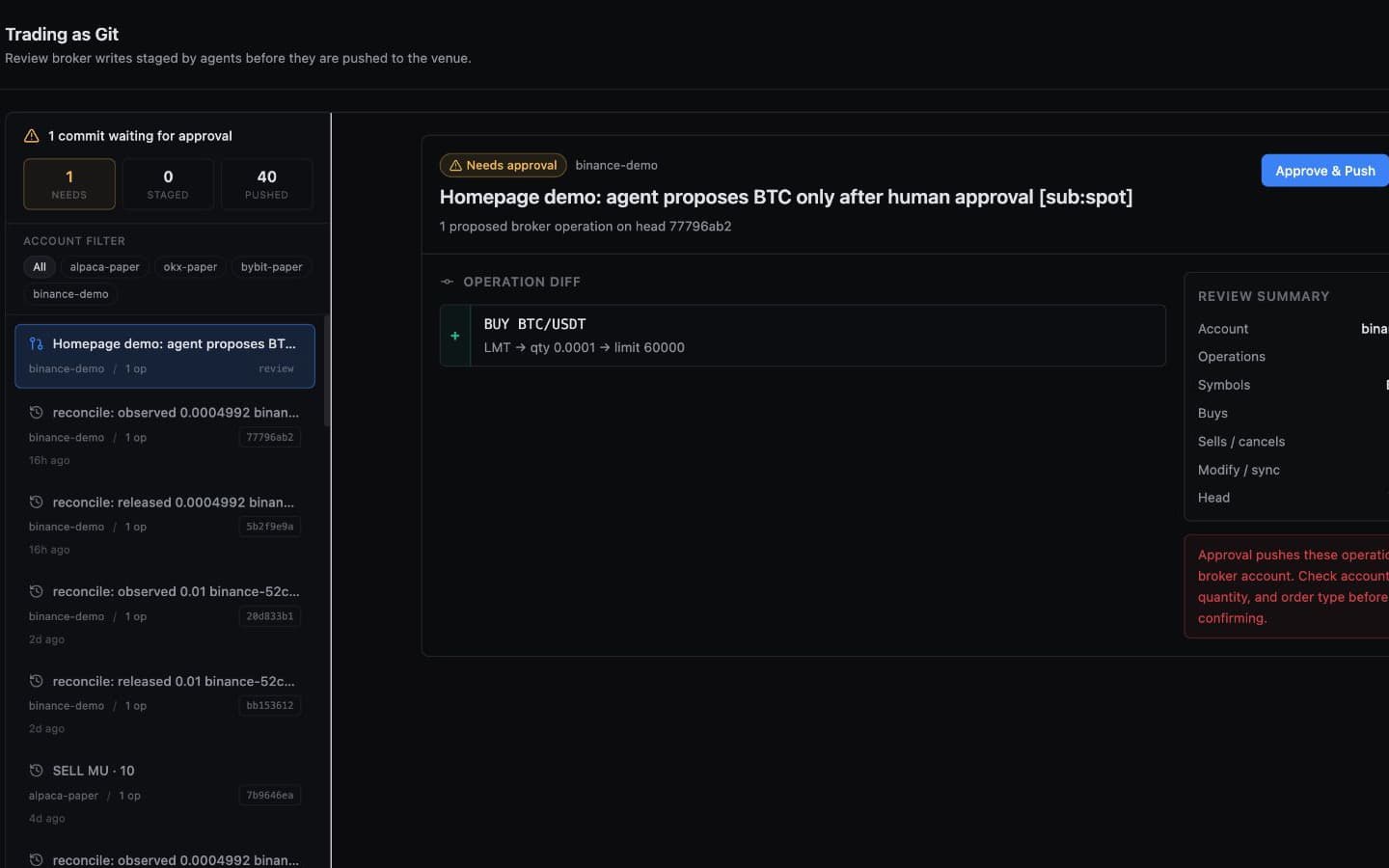
Review a pending demo-account commit and its exact operation diff. The first Approve & Push click only reveals the separate Confirm push step. The recording stops before that final confirmation: no broker push is submitted and no order is executed.
Default and recommended: keep Allow AI to push trades off in Settings → Agent Permissions. Then every AI-initiated push waits for human approval in the Web UI or the linked Telegram owner's
/utapanel. In Pro mode an operator can deliberately enable that switch, which letstradingPushexecute committed operations directly. The audit workflow remains, but the human approval step does not.
The Analogy
| Git | Trading |
|---|---|
git add | Stage an order (placeOrder, closePosition, modifyOrder, cancelOrder) |
git commit -m "..." | Bundle staged operations with a message, get an 8-char hash |
git push | Request execution; waits for human approval in OpenAlice or linked Telegram /uta by default, or executes directly when AI push is explicitly enabled |
git log | Review commit history with hashes, timestamps, and results |
git show <hash> | Inspect a specific commit's operations and outcomes |
git status | See what's currently staged |
Stage
Staging adds operations to the staging area without executing them. Alice stages operations through AI tools:
- placeOrder — Stage a new order (buy/sell with order type, quantity, price)
- closePosition — Stage closing an existing position (full or partial)
- modifyOrder — Stage a change to a pending order
- cancelOrder — Stage cancellation of a pending order
Multiple operations can be staged before committing. For example, Alice might stage closing one position and opening another in a single commit.
Commit
Committing bundles all staged operations with a descriptive message and generates an 8-char SHA-256 hash:
commit a3f8c1d2 — "Rotate from AAPL to NVDA based on AI momentum analysis"
  placeOrder: SELL 10 AAPL @ MKT
  placeOrder: BUY 5 NVDA @ LMT 135.00
At this point, nothing has been sent to the broker. The commit is prepared for push; under the default policy it is waiting for your approval.
Push
Push is the execution step. Its authority depends on the global settings:
- Default:
tradingPushreturns the pending operations and asks the agent to send you to Trading → Trading as Git or an account-detail page in the same navigator for approval. A linked Telegram owner may review the same pending commit through/uta. - Explicit AI delegation: in Pro mode, enabling Allow AI to push trades
lets
tradingPushdispatch the committed operations immediately.
Once a push is authorized by either path, the system:
- Validates the push — the UTA checks the staged operations and account routing before broker contact
- Dispatches to the broker — approved operations are sent to the broker API
- Records results — each operation gets a status:
submitted,filled,rejected, orcancelled - Takes a snapshot — account state is captured for equity curve tracking
- Saves the commit — the full commit (operations + results + state) is persisted to disk
Optional push-time middleware can reject an operation before dispatch. Global Readonly mode and per-account read-only policy can also block venue mutation. Human approval is the main default wall; enabling AI push deliberately removes that one wall, not the others.
A committed approval specimen is immutable. While it is waiting, UTA refuses new staging or another commit on that account; push or reject the pending commit before preparing more operations. Every approval or rejection submits the expected pending hash from the review it displayed. A missing or changed hash returns a conflict without writing, so a stale Web or Telegram action cannot approve different operations after a refresh or race.
Reject
Rejection comes from two directions, and they're distinct:
- Alice discards her own stage — the
tradingRejecttool is the undo for a wrong stage, likegit reset. Alice discards her staged (and committed-but-unpushed) operations herself; nothing is sent to the broker. If only a raw stage exists, it's committed transparently first so the recorded entry stays clean. - You reject a pending commit — under the default manual-approval policy, you turn it down from the Web UI or the linked Telegram
/utapanel instead of approving. This is the human's call at the push wall. When AI push is enabled, call timing matters because a committed operation can be dispatched as soon as the agent invokestradingPush.
Either way the operations are recorded as user-rejected in the history, so Alice sees what was turned down and why, which informs future decisions.
commit b7e2f190 — "[rejected] Aggressive leveraged position — too much risk for current portfolio"
  placeOrder: BUY 100 TQQQ @ MKT (user-rejected)
Sync
After a push, orders may not be immediately filled — exchanges are asynchronous. The tradingSync tool checks the broker for order status updates:
- Pending orders that have been filled get their fill price and quantity recorded
- Cancelled or expired orders are marked accordingly
- A sync commit is created with the updates
commit c4d9e0a1 — "[sync] 2 order(s) updated"
  synced → filled @135.20 (5 filled)
Reading History
Three tools let you inspect the trading history:
- tradingLog — List recent commits with hashes, messages, and operation summaries. Filter by symbol to see all activity on a specific asset.
- tradingShow — Inspect a specific commit by hash — see every operation, its result, and the account state at that point.
- tradingStatus — See what's currently in the staging area and the head commit hash.
The Web UI renders structured order terms from the same commit history. For a place order it shows side and symbol together with order type, exact share or cash quantity, limit/stop price, time in force, and result status. The original commit thesis remains visible in detail, while a fill price is displayed as an execution result rather than replacing the requested order price.
Example Conversation
You: Buy 10 shares of AAPL at market price.

Alice: I've staged a market buy order for 10 AAPL shares.

      Staging area:
      • placeOrder: BUY 10 AAPL @ MKT

      Committing as "Buy 10 AAPL — market order per user request"
      Commit hash: a3f8c1d2

      Ready to push. Shall I execute?

You: Yes, go ahead.

Alice: Pushed commit a3f8c1d2.
      • BUY 10 AAPL @ MKT → submitted (orderId: abc123)

      The order has been submitted to Alpaca. Let me sync to check
      if it's been filled...

      Synced: order abc123 filled @ $187.42
Why This Design?
The git workflow solves several problems:
- Auditability — Every decision has a hash, timestamp, and message. You can trace exactly what happened and why.
- Safe default — Manual approval in OpenAlice or linked Telegram prevents accidental AI execution unless the operator deliberately enables direct AI push.
- Batching — Multiple related operations can be committed together as a logical unit.
- Async settlement — The sync step cleanly handles the gap between order submission and fill.
- AI learning — Rejected commits teach Alice what you don't want, improving future suggestions. Alice can also reject her own staged operations (
tradingReject) when she catches a mistake before the push wall.
Next Steps
- Quick Start — Walk through the approval flow with a paper account.
- Orders & Execution — See order types and push-time behavior.
- Trading Setup — Connect the account that owns each trading log.
- Snapshots & Equity — Track what happened after approved pushes.